Key takeaways
- Check whether the power supply, motherboard and case use standard sizes. Proprietary parts can limit future upgrades.
- Ensure the power supply has enough wattage and the right connectors for a future GPU upgrade.
- Look for open RAM slots and spare M.2 slots for storage.
- Confirm the warranty terms and whether opening the case affects them.
- Check ports for headsets, controllers and multiple monitors.
- Keep the vents clear and clean dust regularly, following the maker’s guidance.
- Use a surge protector, and do not open power supplies, which can hold dangerous charge.
For esports titles such as Valorant, Counter-Strike 2, League of Legends, Fortnite and Rocket League, a mid-range prebuilt with a modern six- to eight-core CPU, a mainstream graphics card and fast memory is enough for high frame rates at 1080p, and buyers who want 240 Hz or higher at 1440p should step up to a stronger GPU. In esports, CPU speed, RAM speed, cooling and a high-refresh monitor matter as much as the graphics card.
Our top picks
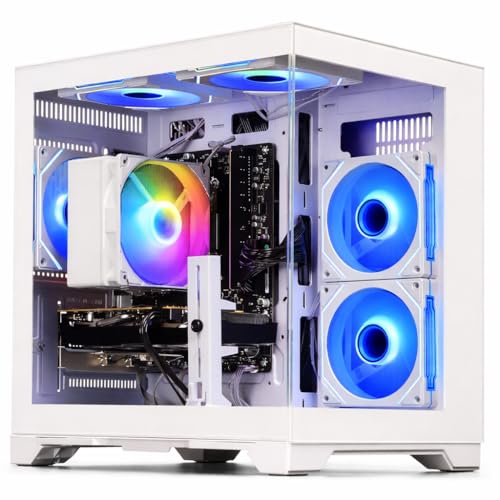

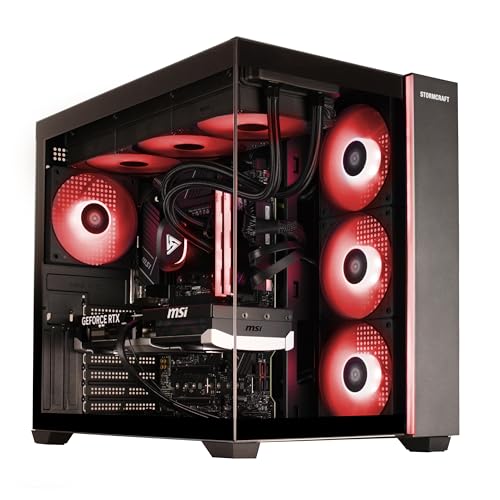

As an Amazon Associate we earn from qualifying purchases at no extra cost to you.
What Esports Games Need
Competitive shooters and MOBAs are generally less demanding on graphics than big single-player titles, so many players cap settings at low or medium for clarity and frames. Counter-Strike 2 and Fortnite, particularly in performance modes, can lean heavily on the CPU. Valorant and League of Legends run on modest hardware, while Fortnite with high settings, Apex Legends and Marvel Rivals ask for more. Because requirements change with patches, read each game’s current specs before buying.
At a Glance
| System family | Best for | Typical specs the maker lists | Limits |
|---|---|---|---|
| Skytech Gaming Shadow and Chronos series | Value-focused 1080p esports | Ryzen or Intel Core CPU with GeForce RTX or Radeon RX GPU, 16 GB RAM | Standard parts, limited upgrade support |
| CyberPowerPC Gamer Xtreme and Gamer Master | Budget to mid-range, large variety | Wide range of CPU and GPU configurations | Case and cooling quality vary by model |
| iBUYPOWER Y40 and Slate series | Entry to mid-range builds | Intel or AMD CPU with RTX or RX GPU | Proprietary parts on some models |
| HP Omen and Victus | Mainstream buyers, warranty-minded | Intel or Ryzen with RTX GPUs | Proprietary motherboards or power supplies on some |
| Alienware Aurora | Compact premium desktop | High-end Intel or AMD CPUs with RTX GPUs | Premium tier, restricted upgrades |
| MSI Aegis and Codex | Mid-range to high-end | Ryzen or Intel CPU, RTX GPU | Some models use proprietary parts |
| NZXT Player series | Clean builds with standard parts | Intel or AMD CPU with RTX GPU | Premium tier relative to spec |
| ASUS ROG and TUF desktops | Premium design and strong cooling | High-end CPUs and GPUs | Premium tier |
Configurations change frequently and the same family name may ship with different parts, so read the exact specification, not just the model name.
What to Prioritise
CPU
For esports, strong single-core performance and cache size matter. AMD Ryzen chips with large cache, such as X3D models, are often cited by reviewers as strong for competitive shooters. Intel Core processors are also capable. A six-core CPU is generally sufficient; eight cores give headroom for streaming or background apps.
GPU
A mainstream card such as a GeForce RTX 5060-class or Radeon RX 9060-class model, or the previous-generation equivalent, is typically enough for 1080p high-refresh play. Targeting 1440p at 240 Hz in demanding titles generally calls for a higher tier.
RAM and storage
Sixteen gigabytes of RAM is the typical baseline, with 32 GB useful for streaming or multitasking. Dual-channel configurations improve performance, so avoid single-stick prebuilts. An NVMe SSD shortens load times, and 1 TB is a sensible starting point as games are large.
Cooling and noise
Sustained loads and dust build up temperatures. Look for a case with good airflow, a tower cooler or liquid cooler suited to the CPU, and fans that are accessible for cleaning. Quiet operation also helps with voice chat.
Monitor and peripherals
A 144 Hz monitor is the minimum for competitive play, with 240 Hz or higher popular among serious players. A prebuilt that outputs frames the monitor cannot display is wasted spend. Budget for a fast monitor, a low-latency mouse and a keyboard.
Budget Tiers
Budget
Entry-level prebuilts pair a six-core CPU with an entry GPU and 16 GB of RAM. They handle Valorant, League of Legends and CS2 at 1080p with high frame rates in most cases. They may require upgrades for demanding titles.
Mid-range
Mid-range systems provide stronger GPUs, faster RAM and better cooling, suited to 1080p at very high frame rates and 1440p in many titles. For most players this is the sensible tier.
Premium
Premium systems add higher-end GPUs, larger SSDs and better cases, aimed at 1440p or 4K, streaming and heavy multitasking. The extra cost rarely pays off for pure esports performance at 1080p.
Compatibility and Upgrade Notes
- Check whether the power supply, motherboard and case use standard sizes. Proprietary parts can limit future upgrades.
- Ensure the power supply has enough wattage and the right connectors for a future GPU upgrade.
- Look for open RAM slots and spare M.2 slots for storage.
- Confirm the warranty terms and whether opening the case affects them.
- Check ports for headsets, controllers and multiple monitors.
- Keep the vents clear and clean dust regularly, following the maker’s guidance.
- Use a surge protector, and do not open power supplies, which can hold dangerous charge.
Pick X If… Decision Table
| If you… | Pick | Why |
|---|---|---|
| Play Valorant, LoL or CS2 at 1080p | Budget to mid-range prebuilt from Skytech, CyberPowerPC or iBUYPOWER | Enough performance at a lower tier |
| Want a name-brand warranty | HP Omen or MSI | Established support networks |
| Prioritise upgrades | NZXT or a system with standard parts | Easier future swaps |
| Stream while you play | Eight-core CPU, 32 GB RAM, strong cooling | Headroom for encoding |
| Want 1440p at high refresh | Mid-range to high-tier GPU system | More GPU throughput |
| Want compact, quiet design | Alienware Aurora or ASUS ROG | Premium engineering |
Alternatives
- Self-built PC: often gives more control over parts and cost, but needs time and some skill.
- Gaming laptops: portable, but typically cost more for the same performance and run hotter.
- Refurbished or previous-generation prebuilts: offer value if the specs suit the games you play.
- Mini PCs with discrete GPUs: compact options for small desks, with limited upgradability.
Settings and Frame-Rate Tips
Many competitive players lower shadows, effects and texture quality to cut distractions and raise frame rates. Reviewers often suggest capping frame rates slightly below the monitor refresh rate if tearing appears, or using adaptive sync such as G-Sync or FreeSync when supported. Keep graphics drivers up to date, and use a wired connection for online play, since network lag cannot be fixed by a faster PC. Read the game recommended specs, as they change with updates and new seasons.
Prebuilt Red Flags
- Single stick of RAM: halves memory bandwidth in many systems. Look for two matched sticks.
- Vague part listings: a listing that omits the power supply or motherboard model often hides budget parts.
- Weak power supply: limits upgrades and may be a reliability concern. Look for a recognised brand with an efficiency rating.
- Tiny storage: a 500 GB drive fills quickly with several competitive titles.
- Bloatware: extra software can slow startup. See whether it can be removed.
- Restricted airflow: glass-fronted cases with no front intake can run hot.
Warranty and Support
Read the warranty length, what it covers and how repairs work, such as mail-in or on-site. Some makers allow component upgrades without voiding the warranty, while others do not. Keep the original packaging for the first few weeks in case of a return, and photograph the build quality when it arrives. Contact the seller promptly if parts are missing or damaged.
Power, Heat and Room Setup
A competitive session can run a PC under sustained load for hours, so place the tower where its intake and exhaust vents are not blocked by walls, carpet or a desk cabinet. Keep it off the floor if dust is a problem. Use a quality power strip with surge protection, and keep liquids away from the case. If fans become loud or the system throttles, power it down and clean filters according to the maker’s manual instead of opening sealed components. For anything involving the power supply, seek a qualified technician.
Peripherals matter too: a wired or low-latency wireless mouse, a keyboard with fast actuation and a headset that gives clear positional audio are all common choices among competitive players. Because personal preference varies, try them where possible before spending on premium versions.
Frequently Asked Questions
What specs do I need for esports gaming?
A six-core modern CPU, 16 GB of RAM, an NVMe SSD and a mainstream GPU are typically enough for high frame rates at 1080p. Heavier titles or 1440p need a stronger graphics card.
Is CPU or GPU more important for esports?
Both matter, but many esports titles lean on the CPU to reach very high frame rates. A balanced system works better than a high-end GPU paired with a weak CPU.
Do I need a 240 Hz monitor?
A 144 Hz monitor is a solid starting point. A 240 Hz or higher display can help competitive players if the PC can hold those frame rates consistently.
Is a prebuilt PC worth it?
A prebuilt saves time, includes a warranty and is ready to use. The trade-offs are possible proprietary parts, extra markup and less control over components.
How much RAM do I need?
Sixteen gigabytes is a common baseline. Choose 32 GB if you stream, run many apps or play heavier titles. Dual-channel memory improves performance.
Can I upgrade a prebuilt gaming PC later?
Often yes, particularly with standard parts, but some models use proprietary components. Check the power supply, case size and open slots before buying.