Our Short List of 3

- Best for: Dedicated sim rooms that want a 4K image and flexible placement.
- Resolution: 4K UHD (3840×2160)
- Light source: laser, 20,000-hour life
- Brightness: 5,100 ANSI lumens
- Throw ratio: 0.81–0.89 with 1.1x zoom
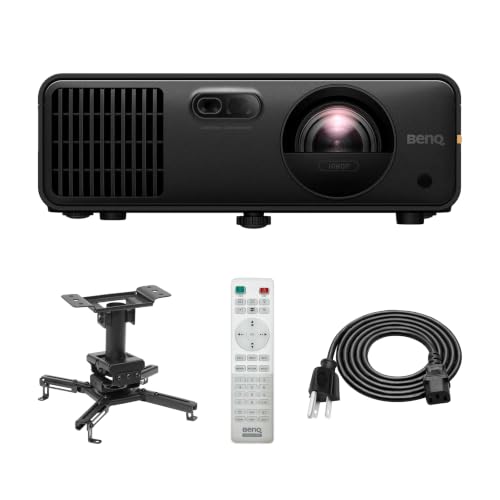
- Best for: Builders who want the projector and mount sorted in a single order.
- Resolution: 1920×1080
- Light source: laser, 20,000-hour life
- Brightness: 4,000 ANSI lumens
- Throw ratio: 0.69–0.83 with 1.2x zoom

- Best for: Shallow garages where the projector must live close to the screen.
- Resolution: 1080p (1920×1080), accepts 4K HDR input
- Light source: DuraCore laser, up to 30,000 hours
- Brightness: 4,200 lumens (maker-stated)
- Throw ratio: about 0.496; 120-inch image from 4 ft 4 in
All 5 Picks at a Glance
| Product | Specs | Action |
|---|---|---|
| BenQ LK936ST |
| Check price on Amazon |
| BenQ AH700ST |
| Check price on Amazon |
| Optoma GT2100HDR |
| Check price on Amazon |
 Optoma GT2000HDR |
| Check price on Amazon |
 BenQ TH671ST |
| Check price on Amazon |
Key takeaways
- Five short-throw golf simulator projectors compared on throw ratio, brightness, laser life and input lag, with picks for garages and dedicated sim rooms.
A golf simulator projector has one job a home theater projector does not: fill a wide impact screen from just a few feet away, without your own shadow falling across the image every time you step up to the ball. That makes throw ratio, not resolution, the decision that shapes everything else. Pick a projector that needs more room than you have, and no amount of brightness or sharpness will rescue the setup.
This roundup is for garage golfers working around parked cars and storage shelves, and for players building a dedicated sim room who want the image dialed in once and left alone. Each pick below is a short-throw model sold or specified for simulator use, chosen from its Amazon listing name and specifications: native resolution, throw ratio, light source, stated brightness, and input lag where the listing gives it.
Quick Picks
As an Amazon Associate we earn from qualifying purchases
| Product | Best for | Key spec from title |
|---|---|---|
| BenQ LK936ST | Dedicated rooms that want a 4K image | 4K UHD short-throw laser |
| BenQ AH700ST | Buyers who want the mount handled in one box | 1080p laser with ceiling mount |
| Optoma GT2100HDR | Short garages with very little throw distance | Ultra-short throw ratio near 0.496 |
| Optoma GT2000HDR | Compact builds and faster-playing setups | 8 ms input lag at 1080p120 |
| BenQ TH671ST | Lamp-based value with proven sim geometry | 1080p short throw, 0.69–0.83 ratio |
How to Choose
Throw Ratio Against Your Room Depth and Screen Size
Throw ratio tells you how far the projector sits from the screen for a given image width, and it is the first number to check against your tape measure. A ratio near 0.5, like the Optoma models below, throws a 120-inch image from roughly four feet four inches, which suits shallow garages. Ratios in the 0.69 to 0.89 range need more depth but reward you with lens shift or zoom flexibility. Measure from screen to the spot safely behind your swing, then shortlist only projectors whose ratio fits that distance at your screen size.
Brightness for Garage Ambient Light
Garages rarely go fully dark. Door windows, overhead fluorescents, and a workbench lamp all wash out a projected image, so simulator brightness claims matter more here than in a theater room. Laser models in this roundup state figures from 3,500 to 5,100 lumens, which gives headroom to run a slightly dimmer eco setting and still see ball flight clearly. Treat every figure as the maker’s own stated number, since measuring methods vary between brands. If your space has blackout control, you can trade some brightness for resolution or a lower lag figure instead.
Laser Versus Lamp Light Sources
Four of these five projectors use laser light sources rated for 20,000 to 30,000 hours, which in practice means years of sim sessions without a lamp swap, plus consistent brightness that fades slowly rather than dropping off. The BenQ TH671ST takes the older lamp route: 4,000 hours in normal mode, stretching toward 15,000 hours in its LampSave setting, with a replacement lamp as an eventual running cost. Neither choice is wrong. Laser suits set-and-forget rooms; a lamp model can make sense when the projector doubles as a general gaming display and the upfront trade-offs matter more.
Input Lag and Refresh for Ball-Flight Realism
Your launch monitor measures the shot; the projector only has to draw it without a perceptible delay between impact and the ball’s flight on screen. The Optoma GT2000HDR lists 8 milliseconds of input lag at 1080p and 120 Hz in its Enhanced Gaming Mode, and 16 milliseconds at 60 Hz, while the lamp-based TH671ST lists 16 milliseconds. Figures like these keep the visual feedback tight enough that a draw or fade on screen matches what your hands just did. Check that your PC or console can actually output the refresh rate the projector needs to hit its lowest lag.
The 5 Best Options
BenQ LK936ST
- Best for: Dedicated sim rooms that want a 4K image and flexible placement.
- Resolution: 4K UHD (3840×2160)
- Light source: laser, 20,000-hour life
- Brightness: 5,100 ANSI lumens
- Throw ratio: 0.81–0.89 with 1.1x zoom
Dedicated sim rooms that want a 4K image and flexible placement.
Use BenQ’s own 0.81–0.89 throw figures when planning your mount; at least one retailer listing overstates the range, and planning around the wrong numbers will misplace your ceiling mount.
The LK936ST is the flagship-style pick here: a 4K UHD laser projector built specifically around simulator geometry, with BenQ’s Golf Mode and a throw ratio that works in mid-depth rooms. Its lens shift is the real differentiator, letting you nudge the image vertically and horizontally without physically re-aiming the mount, which is gold when a ceiling joist dictates placement. At roughly fifteen pounds it is a fixed-install piece rather than something you move between rooms, and that is exactly how it should be treated: mount it once, align it, and let the 20,000-hour laser get on with it.
BenQ AH700ST
- Best for: Builders who want the projector and mount sorted in a single order.
- Resolution: 1920×1080
- Light source: laser, 20,000-hour life
- Brightness: 4,000 ANSI lumens
- Throw ratio: 0.69–0.83 with 1.2x zoom
Builders who want the projector and mount sorted in a single order.
This ASIN is the mount-bundle listing, not the bare projector, so check exactly what is in the box before assuming you still need to buy mounting hardware separately.
The AH700ST pairs a 1080p laser engine with the same Golf Mode thinking as its 4K sibling, then adds a genuinely practical twist: this listing bundles a universal ceiling mount, so the two purchases most sim builders make together arrive as one. Its Auto Screen Fit feature aims to square the image to your screen with less manual keystone fiddling, and the 0.69–0.83 throw range with 1.2x zoom gives some freedom in rooms of middling depth. HDR10 support and a 20,000-hour laser life round out a package aimed at players who want a clean install and minimal ongoing adjustment.
Optoma GT2100HDR
- Best for: Shallow garages where the projector must live close to the screen.
- Resolution: 1080p (1920×1080), accepts 4K HDR input
- Light source: DuraCore laser, up to 30,000 hours
- Brightness: 4,200 lumens (maker-stated)
- Throw ratio: about 0.496; 120-inch image from 4 ft 4 in
Shallow garages where the projector must live close to the screen.
The 4,200-lumen figure is Optoma’s own stated number; an independent measurement came in lower, around 3,012 ANSI lumens, so judge brightness headroom conservatively if your garage lets in a lot of daylight.
The GT2100HDR is built for the tightest rooms in this roundup. Its throw ratio near 0.496 puts a 120-inch image on the screen from about four feet four inches, so the projector can sit close to the impact screen, well forward of your swing path. The DuraCore laser is rated up to 30,000 hours, the chassis weighs just 6.61 pounds, and it accepts a 4K HDR signal even though the native image is 1080p. For a garage where every foot of depth is contested by a car bumper or a freezer, that combination of short throw and light weight is hard to argue with.
Optoma GT2000HDR
- Best for: Compact builds that also double as a low-lag gaming display.
- Resolution: 1080p (1920×1080), accepts 4K HDR input
- Light source: DuraCore laser, up to 30,000 hours
- Brightness: 3,500 lumens
- Throw ratio: about 0.496; 120-inch image from 4 ft 4 in
Compact builds that also double as a low-lag gaming display.
The 8-millisecond figure only applies at 1080p and 120 Hz, so your source device and cable run need to support that mode; at 60 Hz the lag doubles.
Think of the GT2000HDR as the slightly smaller sibling in Optoma’s compact laser line: same roughly 0.496 throw, same 30,000-hour DuraCore laser family, and a sealed, dust-resistant build, but with its headline act aimed at responsiveness. Optoma lists input lag of 8 milliseconds at 1080p and 120 Hz in Enhanced Gaming Mode, doubling to 16 milliseconds at 60 Hz, which makes it the natural pick if the sim shares duty with fast-paced gaming. At 9.6 pounds in a body under eleven inches wide, it also suits shelf or short-mount placements where a full-size chassis would crowd the hitting zone.
BenQ TH671ST
- Best for: Players who accept a future lamp swap in exchange for proven sim geometry and simple setup.
- Resolution: 1080p (1920×1080)
- Light source: lamp (not laser)
- Brightness: 3,000 ANSI lumens
- Throw ratio: 0.69–0.83 with 1.2x zoom
Players who accept a future lamp swap in exchange for proven sim geometry and simple setup.
This is an older lamp model first sold years ago, and renewed versions circulate under different ASINs; make sure the listing you land on is this ASIN, and budget mentally for a replacement lamp down the road.
The TH671ST is the honest veteran of this group: a lamp-based 1080p short-throw projector that has been a simulator staple for years, with a 0.69–0.83 throw range that matches many garage and room layouts. Its 16-millisecond input lag keeps shot feedback feeling connected, the built-in 5-watt speaker covers basic audio without extra gear, and its color specification centers on the Rec.709 standard used by most sim software. The trade-off is written into the design: a lamp that will eventually need replacing, in exchange for a proven, straightforward projector that asks very little of its owner day to day.
Which One Fits Your Situation
Your Garage Is Shallow and the Car Still Has to Fit
Depth is your binding constraint, so start with the two Optoma models and their throw ratio near 0.496, which fills a 120-inch screen from about four feet away. The GT2100HDR brings the higher maker-stated brightness for leakier light; the GT2000HDR answers with the lower input lag figure. Either keeps the projector forward of your swing and out of the car’s way.
You Are Building a Dedicated Room, Once
With depth to spare and a fixed mount, the BenQ LK936ST earns its place: 4K resolution, lens shift for fine alignment, and a 20,000-hour laser you can effectively forget. If the room tops out at 1080p sources, the AH700ST covers the same install-once brief and folds the ceiling mount into the same purchase, which simplifies the build list.
The Sim Doubles as a Gaming Setup
Lag is the spec that matters after dark, so the Optoma GT2000HDR leads here with its listed 8 milliseconds at 1080p120, provided your PC can feed it that signal. The BenQ TH671ST is the alternative at 16 milliseconds with a built-in speaker for casual sessions, accepting that a lamp replacement sits somewhere in its future.
You Want the Simplest Possible First Build
Choose the AH700ST if decision fatigue is the enemy: projector and universal ceiling mount in one listing, Auto Screen Fit to square the picture, and a laser that needs no lamp planning. Players comfortable with a little more setup can step sideways to the GT2100HDR for a shorter throw, but the bundle removes the two most common first-build stalls.
Common Mistakes
- Buying by resolution first and throw ratio second, then discovering the projector needs to sit where your backswing goes.
- Planning the mount around a retailer’s overstated throw range instead of the manufacturer’s own figures, as happens with the LK936ST.
- Comparing brightness numbers across brands as if they were measured identically; treat each as the maker’s own stated figure.
- Assuming a bundle listing is the bare projector, or the reverse, and ending up with duplicate or missing mounting hardware.
- Forgetting that a lamp model’s low running cost story changes the day the lamp reaches the end of its rated hours.
Frequently Asked Questions
How far from the screen should a golf simulator projector sit?
It depends entirely on throw ratio and screen size. A model with a ratio near 0.5, like the Optoma picks here, fills a 120-inch screen from about four feet four inches. Ratios between 0.69 and 0.89 need noticeably more depth. Measure your room first, then match the ratio to the distance you can actually give it.
Is 1080p enough, or should a simulator projector be 4K?
For most simulator software, 1080p at typical viewing distances looks clean, and all five projectors here are built around sim use. The 4K LK936ST earns consideration in dedicated rooms with large screens and close seating, where the extra pixels stay visible. In a garage build, throw fit and brightness usually matter more than the resolution step.
How long do these projectors last before the light source needs attention?
The laser models list 20,000 to 30,000 hours of light-source life, which covers many years of regular simulator sessions without a swap. The lamp-based TH671ST lists 4,000 hours in normal mode and up to 15,000 hours in LampSave, after which a replacement lamp restores full brightness. Laser ownership is simpler; lamp ownership is more predictable in cost timing.
Can I use a regular home theater projector for a golf simulator?
Only if its throw ratio happens to fit your room, which standard-throw models rarely do in garages, and your body will likely block the beam and cast shadows on the screen. Short-throw placement in front of or above the hitting area is the whole point of the five models in this roundup, so geometry, not brand category, is the real test.
More from Amazon
Programs that pair well with the guide above. Offers and eligibility are set by Amazon and may change.
Free shipping on eligible items, Prime Video and more. Eligible new members can start with a free trial.
Start a Prime free trialA Prime membership for ages 18-24 with a trial period. Eligibility is set by Amazon.
See Prime for Young AdultsAudiobooks and podcasts to listen to on the go. Eligible new members can start with a free trial.
Try Audible freeAd-free music streaming. Eligible new subscribers can start with a free trial.
Try Music Unlimited freeAs an Amazon Associate we earn from qualifying purchases.