Key takeaways
- Compare the best audio interfaces for home recording: five two-input USB models from Focusrite, MOTU, Universal Audio, Steinberg and PreSonus compared.
A USB audio interface connects your microphones and instruments to your computer, and it shapes your recordings more than almost any other single purchase. It decides how clean your vocals sound, how much gain you have for quiet microphones, and how low your monitoring latency feels. The two-input desktop class is now very mature: every model here records two channels at once, powers condenser microphones, and works with the major recording apps on Mac and Windows.
This guide compares five two-input interfaces from five different makers. If you want help setting levels, look at the Focusrite. If metering and playback quality matter most, look at the MOTU. If you record keyboards and other MIDI gear, note that four of these five include traditional MIDI ports, which many newer rivals have dropped.
Disclosure: As an Amazon Associate, I earn from qualifying purchases.
Focusrite Scarlett 2i2 4th Gen

The Scarlett 2i2 4th Gen is the interface most home recordists start with, and this generation is a genuine step up from older Scarlett models. Its two microphone preamps deliver 69dB of gain, generous for this class and helpful with quieter dynamic microphones. The headline helpers are Auto Gain, which sets your input level for you, and Clip Safe, which adjusts gain before a loud moment can spoil a take. Air mode adds console-style character, with a Presence setting that lifts the top end and a Harmonic Drive setting that adds mid-range harmonics.
Conversion runs up to 24-bit/192kHz with a quoted 120dB dynamic range, and a loopback feed covers streaming or recording computer audio alongside your microphone. The unit is bus powered over USB-C. The trade-offs are clear: no MIDI ports, and a single headphone output. For a solo singer, guitarist, or podcaster who wants the safety net of automatic level control, this is the most forgiving place to start.
Specs
- ASIN: B0C5JRTS3Y
- Inputs: 2 combo mic, line and instrument inputs
- Outputs: 2 line outputs, 1 headphone output
- Preamps: 2 ultra-low-noise mic preamps with 69dB gain range
- Resolution: 24-bit/192kHz, 120dB dynamic range
- Features: Auto Gain, Clip Safe, Air with Presence and Harmonic Drive, loopback
- Connection: USB-C, bus powered
- MIDI: none
MOTU M2

The MOTU M2 takes a different approach: instead of automatic helpers, it gives you precise information and lets you set levels yourself. A full-color LCD screen shows detailed level meters for every input and output, so you can check gain at a glance without opening software. Playback quality is a strength, thanks to ESS Sabre32 Ultra converter technology with a measured 120dB dynamic range on the balanced main outputs.
The two combo mic, line and guitar inputs have individual phantom power, and MOTU quotes round-trip latency of just 2.5 milliseconds at 96kHz with a small buffer, which helps when monitoring through software effects. Unlike the Focusrite above, the M2 keeps traditional MIDI in and out ports, plus loopback channels for streaming. It is bus powered over USB-C and includes MOTU Performer Lite and Ableton Live Lite. Choose it if you value metering, playback fidelity, and MIDI in a compact box.
Specs
- ASIN: B0812B26TN
- Inputs: 2 combo XLR and TRS mic, line and Hi-Z guitar inputs
- Outputs: 2 balanced TRS main outputs, mirrored RCA outputs, 1 headphone output
- Preamps: 2 mic preamps with individual 48V phantom power
- Resolution: 24-bit/192kHz, ESS Sabre32 Ultra DAC, 120dB output dynamic range
- Display: full-color LCD input and output metering
- Connection: USB-C, bus powered
- MIDI: 5-pin MIDI in and out, plus loopback
Universal Audio Volt 2
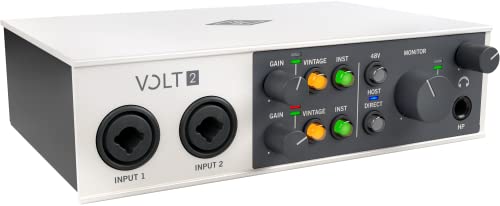
The Volt 2 brings Universal Audio’s analog heritage to a simple two-input desktop interface. Its signature feature is a Vintage preamp mode that adds tube-style character at the press of a button, suiting vocalists and guitarists who find clean preamps a little plain. Recording runs at 24-bit/192kHz, and the interface works with Mac, PC, iPad, and iPhone, handy if you sketch ideas on a tablet and finish them on a computer.
You also get direct monitoring for latency-free listening while you track, a headphone output with its own level control, and MIDI connections for keyboards and controllers. The included software bundle is broad, covering a DAW, pitch correction, and virtual instruments, so beginners can start producing without buying extra programs on day one. There is no automatic gain setting, so you set levels manually, but the Vintage mode gives the Volt 2 a tonal identity none of the others here try to match.
Specs
- ASIN: B09J1W1TYN
- Inputs: 2 mic and instrument inputs
- Outputs: 2 main outputs, 1 headphone output
- Preamps: 2 preamps with switchable Vintage tube preamp mode
- Resolution: 24-bit/192kHz
- Features: direct monitoring, works with Mac, PC, iPad and iPhone
- Connection: USB, bus powered
- MIDI: MIDI in and out included
Steinberg UR22C

The Steinberg UR22C is built around Yamaha’s D-PRE microphone preamps and adds something the others here do not: onboard DSP. That processing lets you monitor with effects such as reverb while tracking, without loading your computer or adding monitoring latency. It records at 32-bit/192kHz, the highest bit depth in this group, and connects over USB 3.0 with a USB-C port, drawing bus power from the computer.
Two combo inputs handle microphones, line sources, and instruments, with a Hi-Z switch for guitar on the first channel. MIDI in and out ports keep hardware keyboards and drum machines in the setup, and the metal chassis feels built for travel. Steinberg bundles Cubase AI for computer recording and Cubasis LE for iPad. Pick the UR22C if you use MIDI gear, like monitoring effects in hardware, or already work in Cubase.
Specs
- ASIN: B07YFH671V
- Inputs: 2 combo mic, line and instrument inputs, Hi-Z on input 1
- Outputs: 2 main outputs, 1 headphone output
- Preamps: 2 Yamaha D-PRE mic preamps with 48V phantom power
- Resolution: 32-bit/192kHz
- Features: onboard DSP for latency-free monitoring with effects
- Connection: USB 3.0 with USB-C port, bus powered
- MIDI: 5-pin MIDI in and out
PreSonus AudioBox USB 96 25th Anniversary
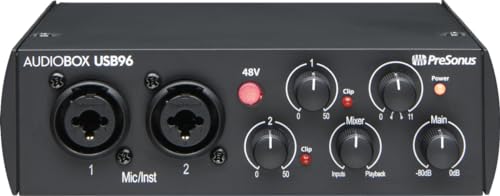
The AudioBox USB 96 has been a first interface for a huge number of musicians, and this 25th Anniversary edition keeps the formula simple and rugged. Two Class-A microphone preamps feed converters running at 24-bit/96kHz, and the steel chassis is made to survive a gig bag. A Mix knob blends your live input against computer playback for zero-latency monitoring without menu diving.
It is bus powered over USB 2.0 and includes MIDI in and out, increasingly rare at the entry end of the market and useful with older keyboards. The software bundle is a real part of the value: Studio One Artist and the Studio Magic plug-in suite are included on registration, giving a beginner a complete recording environment in one box. The 96kHz ceiling is lower than the 192kHz of the other four interfaces here, and the design is older, but for two-microphone recording, two-host podcasting, or guitar and vocal demos, it covers the essentials in a tough shell.
Specs
- ASIN: B08D8R6VFC
- Inputs: 2 front-panel combo mic and instrument inputs
- Outputs: 2 balanced line outputs, 1 headphone output
- Preamps: 2 Class-A mic preamps with switchable 48V phantom power
- Resolution: 24-bit/96kHz
- Features: Mix knob for zero-latency monitoring, steel chassis
- Connection: USB 2.0, bus powered
- MIDI: 5-pin MIDI in and out
How to Choose the Right Audio Interface
Start with inputs. All five interfaces here record two channels at once, which suits solo work, two-person podcasts, and stereo instruments. If you plan to record a full drum kit or a whole band at once, look instead at larger interfaces with four or eight preamps.
Next, check preamp gain and helpers. Quiet dynamic microphones need plenty of clean gain, so a higher gain figure helps. If you are new to setting levels, automatic tools such as Auto Gain and Clip Safe on the Focusrite remove the most common beginner mistake: recording too hot and clipping. Experienced users may prefer the MOTU approach of detailed metering and full manual control.
Then match the extras to your setup. MIDI ports matter if you own hardware synths, keyboards, or electronic drums: the MOTU, Universal Audio, Steinberg, and PreSonus models include them, while the Focusrite does not. Loopback matters for streamers mixing computer audio with a microphone, and onboard DSP matters if you want reverb in your headphones while you sing, without latency. Every model here is bus powered, so one USB cable is enough, but check your computer has the right port or plan on an adapter.
Sample rate numbers deserve a calm read. Recording at 96kHz or 192kHz gives more headroom for heavy pitch and time processing, while 48kHz is sufficient for most songs, podcasts, and videos and uses less disk space. Converter quality, gain range, and microphone technique will shape your results far more than the largest number on the box.
Frequently Asked Questions
Do I need an audio interface if my computer has a microphone input?
Yes, for most recording goals. A dedicated interface gives you proper microphone preamps, phantom power for condenser microphones, balanced monitor outputs, and far lower noise and latency than a built-in input.
Can I record two microphones at the same time with these interfaces?
Yes. Every model in this guide has two microphone preamps, so two hosts, a vocal and an acoustic guitar, or a stereo pair can be captured together, each on its own track.
What is phantom power, and do I need it?
Phantom power is a 48V supply sent through the microphone cable. Condenser microphones need it to work, while most dynamic microphones and instruments do not. All five interfaces here provide it.
Will these interfaces work with my recording software?
In practice, yes. They work with the major recording applications on Mac and Windows, and each maker bundles at least one starter program, from Ableton Live Lite and Cubase AI to Studio One Artist, so you can begin recording immediately.
Conclusion
For most home recordists, the Focusrite Scarlett 2i2 4th Gen is the easiest recommendation because Auto Gain and Clip Safe protect your takes while the preamps stay quiet. The MOTU M2 is the pick for careful level setting, detailed metering, and excellent playback. The Universal Audio Volt 2 suits singers and guitarists who want switchable vintage character, the Steinberg UR22C adds DSP monitoring and 32-bit recording for MIDI-heavy setups, and the PreSonus AudioBox USB 96 remains a rugged, simple starter with a strong software bundle. Match the feature list to your microphones, instruments, and workflow, and any of these five will anchor a capable home studio.
More from Amazon
Programs that pair well with the guide above. Offers and eligibility are set by Amazon and may change.
Free shipping on eligible items, Prime Video and more. Eligible new members can start with a free trial.
Start a Prime free trialA Prime membership for ages 18-24 with a trial period. Eligibility is set by Amazon.
See Prime for Young AdultsAudiobooks and podcasts to listen to on the go. Eligible new members can start with a free trial.
Try Audible freeAd-free music streaming. Eligible new subscribers can start with a free trial.
Try Music Unlimited freeAs an Amazon Associate we earn from qualifying purchases.