
Key takeaways
- Form factor: ATX mid-tower — accepts ATX, micro-ATX, and mini-ITX motherboards
- Finish: white steel chassis with a white exterior and glass side panel
- Cooling layout: mesh-ventilated front intake with multi-fan mounting positions
- GPU clearance: long-card friendly by class — comfortable with today’s three-fan flagship graphics cards
- Radiator support: front-mount AIO radiators up to the common 240mm and 280mm classes, with 360mm support on many configurations of this size
- Front I/O: standard USB Type-A and audio connectivity
The best white PC case overall is the Lian Li O11 Vision Compact (O11VPW): its dual-chamber layout, back-connect motherboard support, and generous 360mm radiator room suit builders who want a showcase build without fighting cable clutter. If you want that panoramic look for less, the NZXT H6 Flow is the value pick for airflow-first builds, while the HYTE Y70 Touch Infinite is the premium choice for anyone who wants an integrated display as the centerpiece. For a straightforward, budget white mid-tower with flagship GPU clearance, the Lian Li V100-ATX is the practical starting point. The right case for you comes down to four numbers: your motherboard form factor, your GPU length, your radiator thickness, and how much side-panel visibility you actually want.
Top 3 Picks
Best overall: Lian Li O11 Vision Compact ATX PC Case, Back-Connect, White (O11VPW). It combines a wraparound glass showcase with serious cooling capacity, including support for large radiators and back-connect motherboards that hide every front-facing cable. Choose it if you are building a display-worthy white system and want clean cable routing built into the design.
Best budget: Lian Li V100-ATX Mid-Tower PC Case in White (V100RW). It delivers the core white mid-tower formula — ATX support, long GPU clearance, and a mesh-friendly front — at the lowest price tier in this roundup. Choose it if your priority is fit and airflow rather than a full glass panorama.
Best premium: HYTE Y70 Touch Infinite. The integrated 2.5K LCD touchscreen turns the case into a display surface for system stats or custom visuals, and the dual-chamber interior keeps components separated for cleaner airflow and wiring. Choose it if the case itself is meant to be the showpiece of the desk.
Quick Comparison
| Product | Best for | Key specs | Price tier |
|---|---|---|---|
| Lian Li V100-ATX (V100RW) | Budget ATX builds with big GPUs | ATX mid-tower, white steel/glass, mesh airflow front, multi-fan mounting | Budget |
| MUSETEX Y6 | Plug-and-play ARGB lighting | ATX mid-tower, 7 pre-installed infinity-mirror PWM ARGB fans, white finish | Mid-range |
| Lian Li O11 Vision Compact (O11VPW) | Showcase builds with back-connect boards | Dual-chamber ATX, back-connect support, panoramic glass, large radiator support | Premium |
| Corsair 3500X RS ARGB | Panoramic glass on a mid-range budget | Mid-tower, panoramic glass corner, RS ARGB fans, white finish | Mid-range |
| NZXT H6 Flow (CC-H61FW-01) | Airflow-first compact builds | Compact dual-chamber mid-tower, panoramic glass, high-performance airflow design | Budget |
| HYTE Y50 RGB Essential | Aesthetic builds with included reverse fans | Dual-chamber, 4 included aRGB fans (1x 120mm + 1x 360mm reverse), white variant | Mid-range |
| RUIX OV303 | Budget builds wanting USB-C up front | ATX mid-tower, 4 pre-installed 120mm prism ARGB PWM fans, USB 3.0 + Type-C | Budget |
| HYXN H3 | Compact dual-cavity on a budget | Compact dual-cavity mid-tower, 6 pre-installed infinity-mirror PWM ARGB fans | Budget |
| HYTE Y70 Touch Infinite | Display-piece premium builds | Dual-chamber, integrated 2.5K LCD touchscreen, modern aesthetic design | Premium |
| Corsair Frame 4500X RS-R ARGB | Premium panoramic glass with a rigid frame | Mid-tower, panoramic glass, RS-R ARGB fans, white finish | Premium |
| NZXT H6 Flow RGB | Airflow plus included RGB fans | Mid-tower, 3 included RGB fans, panoramic glass, cable management features | Mid-range |
| ASUS A31 White Edition | Simple white ATX builds | ATX mid-tower, white edition finish, standard front I/O | Budget |
How We Chose
Every case in this roundup was selected by reading published specifications and matching them against the questions white-case buyers actually ask: will my board fit, will my graphics card fit, what radiators can I mount, and how do the panels and finish hold up over time. We prioritized cases where the manufacturer publishes clear clearance figures — CPU cooler height, GPU length, radiator thickness — because those numbers decide compatibility long before aesthetics do.
We also weighed category fit. A budget pick should not just be cheap; it should still support a full-size ATX board, a modern long GPU, and at least one intake-focused airflow path. A premium pick should justify its tier with structural rigidity, glass quality, and features that genuinely change the build experience, like back-connect support or a dual-chamber layout that gives cables their own space. Mid-range picks sit in the middle: they usually add pre-installed fans, panoramic glass, or both, without premium pricing.
Finally, we considered upgrade path. Cases last through several CPU and GPU generations, so we favored models with enough radiator support to absorb a future move to liquid cooling, enough fan mounts to keep up with hotter components, and enough headroom for thicker cards. Where a listing did not state an exact figure, we described the feature by class rather than guessing a number. Selection is research-based: we compared published specs, brand track records, and category norms — we did not test, benchmark, or handle these cases.
1. Lian Li V100-ATX Mid-Tower (V100RW) – Best for Budget ATX Builds With Big GPUs
As an Amazon Associate we earn from qualifying purchases at no extra cost to you.

The Lian Li V100-ATX in white is the case to buy when you want the essentials done properly and nothing else. Lian Li has a long-standing reputation for aluminum-and-steel build quality, and this model brings that heritage down to the budget tier in a conventional mid-tower shape. It suits first-time builders who want a white case that will not fight them during assembly, and value-focused upgraders who would rather spend the difference on a faster GPU.
Because it is a standard ATX mid-tower rather than a dual-chamber panoramic design, cable management is more traditional: you route cables behind the motherboard tray and through grommets toward the front. That is less glamorous than a dual-cavity layout, but it is also more forgiving if you are learning as you go. The front panel is set up for airflow rather than solid glass, which matters if you plan to run high-wattage components for long gaming sessions.
- Form factor: ATX mid-tower — accepts ATX, micro-ATX, and mini-ITX motherboards
- Finish: white steel chassis with a white exterior and glass side panel
- Cooling layout: mesh-ventilated front intake with multi-fan mounting positions
- GPU clearance: long-card friendly by class — comfortable with today’s three-fan flagship graphics cards
- Radiator support: front-mount AIO radiators up to the common 240mm and 280mm classes, with 360mm support on many configurations of this size
- Front I/O: standard USB Type-A and audio connectivity
Strengths
What makes the V100-ATX worth recommending is the absence of compromise in the places that actually matter. The chassis is rigid, the panels fit flush, and the white finish is applied consistently rather than only on the front fascia. Airflow design is straightforward: front intake, rear exhaust, and a top vent area, which is a combination that works with air coolers and AIOs alike. Because it does not chase a panoramic glass look, more of the budget goes into structure and clearance than into aesthetics, and that shows up in how much room you have for a long graphics card and a tall CPU cooler. For a white build under a tight budget, that trade is usually the right one.
Pros
- Lowest price tier in this roundup while still supporting full ATX boards
- Airflow-first front panel suits high-wattage air-cooled builds
- Clean, consistent white finish on chassis and panels
- Straightforward interior layout is beginner-friendly
- Enough GPU and cooler clearance that you are unlikely to be blocked from a future upgrade
- Understated look that does not depend on RGB to carry the design
Cons
- No panoramic wraparound glass, so it will not deliver the showcase look
- Cable management is conventional rather than dual-chamber easy
- Fans are generally not pre-installed, so factor the cost of two to three fans into your budget
- Less radiator headroom than premium dual-chamber cases
- White surfaces show dust sooner than black, so plan on regular cleaning
How it compares
Against the NZXT H6 Flow — the other budget-tier entry here — the V100-ATX trades the H6 Flow’s compact dual-chamber layout and panoramic glass for a more traditional, roomier ATX interior. If you want the dual-chamber look and airflow-first tuning at a budget price, the H6 Flow wins on aesthetics. If you want maximum conventional clearance and the simplest possible build, the V100-ATX is the safer choice. Against the RUIX OV303, the Lian Li leans on brand pedigree and finish consistency, while the OV303 counters with four pre-installed fans and front USB-C out of the box.
2. MUSETEX Y6 – Best for Plug-and-Play ARGB Lighting

The MUSETEX Y6 answers a very specific question: what if I do not want to buy fans separately? It arrives with seven infinity-mirror PWM ARGB fans pre-installed, which is an unusually high count for a mid-tower and effectively solves the lighting and airflow budget in one purchase. It suits builders who want a fully lit white system on day one without planning a fan ecosystem, and anyone who values PWM control — meaning the fans ramp up and down with system temperature rather than running at a fixed speed.
Infinity-mirror fans are a distinct aesthetic: each fan has a reflective center ring with embedded LEDs, producing a layered, tunnel-like glow rather than a flat light disc. With seven of them in one chassis, the visual effect is dense and consistent across the interior. The Y6 is a standard ATX mid-tower in layout, so assembly follows familiar steps: mount the board, route cables behind the tray, and connect the fan hub.
- Form factor: ATX mid-tower
- Included cooling: 7 pre-installed infinity-mirror PWM ARGB fans
- Lighting: addressable RGB, typically driven from a hub with motherboard sync support
- Finish: white chassis with tempered glass side panel
- Control type: PWM — fan speed responds to thermal load
- Build intent: gaming PC case with a lighting-first interior
Strengths
Seven PWM ARGB fans included at a mid-range price changes the math on a build considerably. Buying that quantity of infinity-mirror fans separately would consume a meaningful slice of a mid-range budget, and you would still have to plan the hub, the daisy-chain wiring, and the motherboard sync. The Y6 removes all of that decision-making. PWM control is the more important half of the story: the fans can spin slowly and quietly at idle and ramp up under load, which is a real noise advantage over fixed-speed RGB fans. The white finish and glass panel keep the case itself visually clean so the lighting does the talking.
Pros
- Seven fans included — exceptional value for a lighting-focused build
- PWM control allows quiet idle operation instead of constant full speed
- Infinity-mirror styling gives a distinctive, cohesive interior look
- White finish throughout matches a white component theme
- Removes the need to research fan compatibility and hub wiring
- High airflow potential from sheer fan count
Cons
- Seven fans can be louder than a well-tuned three-fan setup if curves are not adjusted
- Fan cabling is substantial to route and manage
- Lighting ecosystem is tied to the included hub rather than a premium branded controller
- The design is unapologetically RGB-forward — not for minimalists
- Chassis branding and finish are less refined than premium-tier Lian Li or Corsair options
How it compares
Compared with the HYXN H3, the other fan-heavy budget-to-mid option here, the MUSETEX Y6 includes one more fan and uses PWM infinity-mirror units, while the HYXN H3 pairs six infinity-mirror PWM ARGB fans with a compact dual-cavity layout. If case volume matters and you want the dual-chamber structure, the HYXN wins; if you want maximum fan count and a conventional ATX interior, the Y6 is the stronger pick. Against the NZXT H6 Flow RGB, the Y6 offers four additional fans for a similar tier, though NZXT counters with a more refined chassis design and tighter cable management features. The Y6 is the value play on lighting; the NZXT is the value play on structure.
3. Lian Li O11 Vision Compact (O11VPW) – Best for Showcase Builds With Back-Connect Boards

The Lian Li O11 Vision Compact is the best overall white case in this roundup because it is the rare model that gets structure, cooling, and looks right at the same time. The O11 family established the dual-chamber panoramic layout that much of the industry now imitates, and the Vision Compact variant brings that formula into a slightly smaller footprint while adding support for back-connect motherboards — boards whose power and front-panel headers sit on the rear of the PCB. That single feature transforms cable management: the main cable bundle hides behind the motherboard tray by design rather than by effort.
It suits builders who have committed to a display-piece system, especially those planning an AIO cooler and a vertically visible GPU. It is also the pick for anyone whose motherboard is a back-connect model, because very few cases are purpose-built for that layout.
- Form factor: dual-chamber ATX mid-tower, compact footprint relative to the classic O11
- Motherboard support: dedicated back-connect compatibility plus standard ATX layouts
- Panels: panoramic glass front and side for an uninterrupted interior view
- Radiator support: large-format radiators, including 360mm class mounts on multiple positions
- Chamber design: separate rear chamber for PSU and cable storage
- Finish: white interior and exterior (O11VPW)
- Cooling: multi-fan mounting across top, side, and bottom positions
Strengths
The dual-chamber design is the reason this case justifies a premium tier. By moving the power supply and cable storage into a second chamber behind the motherboard, Lian Li gives the main compartment a clean, open floor plan: intake from the side and bottom, exhaust at the top and rear, and an unobstructed view through the glass. Back-connect support is the other headline. With a compatible board, the 24-pin, CPU power, and front-panel headers all plug in behind the tray, which eliminates the cable combing and grommet threading that normally consumes an hour of a build. Add Lian Li’s chassis rigidity and consistent white interior coating — including the painted internal surfaces, not just the exterior — and you have a case that photographs well from any angle.
Pros
- Purpose-built support for back-connect motherboards
- Dual-chamber layout keeps cables and PSU completely out of the display area
- Panoramic glass delivers the cleanest showcase view in this roundup
- Excellent large-radiator support for high-end AIO cooling
- White finish is applied to interior surfaces, not just exterior panels
- Compact variant reduces desk footprint versus the full-size O11
Cons
- Premium price tier
- Panoramic glass means front intake airflow is limited compared with a mesh-front design
- Back-connect benefits only apply if your motherboard supports it
- Dust accumulates visibly on white interior surfaces and behind glass
- Smaller footprint means tighter clearance for oversized air coolers than a full-size tower
How it compares
Against the HYTE Y70 Touch Infinite, the O11 Vision Compact gives up the integrated LCD touchscreen but gains back-connect motherboard support — a functional advantage you use every day rather than a display you look at. If you want the screen, choose HYTE; if you want the cleanest possible cable-free interior, choose the O11. Against the Corsair 3500X RS ARGB, the Lian Li is the more expensive, more structurally sophisticated case, with a true dual-chamber design versus Corsair’s single-chamber panoramic layout. The Corsair is the better value on looks; the Lian Li is the better long-term platform.
4. Corsair 3500X RS ARGB Panoramic Mid-Tower – Best for Panoramic Glass on a Mid-Range Budget

The Corsair 3500X RS ARGB brings the panoramic glass look into the mid-range tier. Corsair’s “panoramic” designation means the front and side panels meet in a wraparound glass corner without a thick structural pillar interrupting the view, so the interior reads as one continuous display. It suits builders who want that aesthetic but are not ready to pay premium prices, and who prefer a case from a major brand with a well-documented accessory ecosystem.
As a single-chamber mid-tower, the 3500X keeps a conventional internal layout: motherboard tray, PSU shroud at the bottom, cable routing behind the tray. The included RS ARGB fans handle the lighting and baseline airflow, and the white finish ties the exterior together. Corsair’s strength here is consistency — the case is designed to pair cleanly with the company’s coolers, fans, and power supplies, which simplifies matching aesthetics if you are already in that ecosystem.
- Form factor: mid-tower, single-chamber layout
- Panels: panoramic wraparound glass front and side
- Included cooling: RS ARGB fans (count varies by configuration)
- Finish: white exterior and interior surfaces
- Radiator support: 240mm and 360mm class AIO mounting
- Ecosystem: compatible with Corsair fan, cooler, and PSU accessory lines
Strengths
The panoramic corner is the whole point, and Corsair executes it cleanly: the glass-to-glass joint is tidy, and the interior is white-coated so components do not disappear into a black void behind the glass. RS ARGB fans provide immediate lighting without a separate purchase, and the single-chamber layout means more of the case’s internal volume goes to component clearance rather than to a rear cable chamber. That can actually be an advantage for very long GPUs, since nothing is competing for depth. Corsair’s documentation and spare-parts support are also stronger than what you typically get from smaller brands, which matters if you break a panel clip or lose a standoff two years from now.
Pros
- Panoramic glass look at a mid-range price tier
- White interior coating, not just an exterior paint job
- Included RS ARGB fans cover baseline lighting and airflow
- Strong brand documentation and accessory availability
- Single-chamber layout maximizes internal component depth
- Broad radiator support for a mid-range chassis
Cons
- Single chamber means cable management demands more effort than dual-chamber rivals
- Panoramic glass restricts front intake compared with mesh-front cases
- Airflow depends heavily on fan configuration and curves
- Fewer included fans than the MUSETEX Y6 or HYXN H3
- Glass panels require careful handling during cleaning to avoid scratches
How it compares
Against the Corsair Frame 4500X RS-R ARGB, the 3500X is the more affordable Corsair option: same panoramic philosophy and white finish, but without the Frame’s more rigid structural frame and premium positioning. If you want maximum Corsair build quality, step up to the Frame; if you want the look at a mid-range price, the 3500X is the sensible call. Against the NZXT H6 Flow, the Corsair offers a larger, more conventional interior and better vendor support, while the NZXT counters with a compact dual-chamber design that manages cables more easily. Choose the Corsair for ecosystem and serviceability, the NZXT for compact cleverness.
5. NZXT H6 Flow (CC-H61FW-01) – Best for Airflow-First Compact Builds

The NZXT H6 Flow is a compact dual-chamber mid-tower with panoramic glass panels and a design brief centered on airflow. NZXT built its reputation on clean, minimal chassis with thoughtful cable-routing features, and the H6 Flow applies that philosophy to a smaller footprint than a full tower. It suits builders with limited desk or shelf space who still want ATX compatibility, and anyone who prioritizes thermal performance over maximum internal volume.
The dual-chamber arrangement separates the PSU and cable area from the main compartment, which keeps the visible space uncluttered. The airflow emphasis shows in the angled front intake design, which directs air across the motherboard and GPU rather than letting it pool in a corner. As a budget-tier entry with this feature set, it is one of the strongest value propositions in the roundup.
- Form factor: compact dual-chamber mid-tower
- Panels: panoramic glass panels
- Airflow design: high-performance focused intake path with angled front vents
- Motherboard support: ATX and smaller form factors
- Radiator support: 240mm and 360mm class AIO mounting positions
- Cable management: dedicated routing channels and tie-down points
- Finish: white (CC-H61FW-01)
Strengths
The H6 Flow’s angled front intake is genuinely functional rather than decorative: it feeds air directly toward the GPU and CPU cooler without requiring a solid glass front to be removed. Combined with the dual-chamber layout, this gives the case a thermal profile closer to a mesh-front airflow case while keeping the panoramic glass aesthetic. The compact size is a real advantage on a desk, and NZXT’s cable management provisions — channels, hooks, and generous rear clearance — make the small interior easier to work in than its dimensions suggest. At the budget tier, you are getting premium-style structure for considerably less.
Pros
- Dual-chamber design at a budget price tier
- Airflow-focused front intake outperforms solid-glass front designs
- Panoramic glass panels for a showcase look
- Compact footprint suits small desks and shelves
- Well-designed cable routing channels
- Clean, minimal NZXT aesthetic in white
Cons
- Compact interior limits clearance for very tall air coolers and the longest GPUs
- Fans are not included in this configuration
- Smaller volume means less room for multiple large radiators
- Glass panels add weight relative to the case size
- White surfaces require more frequent dusting to stay pristine
How it compares
Against the NZXT H6 Flow RGB, this version is the same chassis concept without the three included RGB fans — so if you already own fans or want to choose your own, the standard H6 Flow is the smarter buy, and if you want lighting out of the box, the RGB variant saves a step. Against the Lian Li V100-ATX, the NZXT wins decisively on aesthetics and cable management, while the Lian Li offers a roomier conventional interior for oversized components. For compact white builds where airflow matters, the H6 Flow is the best combination of price and design in this roundup.
6. HYTE Y50 RGB Essential – Best for Aesthetic Builds With Included Reverse Fans

The HYTE Y50 RGB Essential is aimed squarely at builders who treat the inside of the case as a display. It ships with four aRGB fans, one of which is a 360mm-class reverse fan — a fan designed to be mounted on a side or bottom intake position while showing its lit face inward. That detail matters: reverse fans solve the common problem of intake fans presenting their frame rather than their illuminated blades to the viewer. The Y50 suits builders who want a dual-chamber aesthetic with a curated lighting layout already planned for them.
HYTE’s design language emphasizes the glass-wrapped showcase look, and the Y50 applies it with a white finish option. The dual-chamber structure keeps the PSU and cables out of the main compartment, and the included fan set covers both intake and exhaust roles once installed.
- Form factor: dual-chamber mid-tower
- Included cooling: 4 aRGB fans (1x 120mm + 1x 360mm reverse fan)
- Lighting: addressable RGB with motherboard sync
- Design: aesthetic-forward, glass-showcase oriented
- Finish: white variant available
- Cable management: rear chamber routing for PSU and cables
Strengths
The reverse fan inclusion is the standout detail. In a dual-chamber card-style layout, side-mounted fans act as the primary intake, and a standard fan in that position faces you with its structural frame. A reverse-blade fan flips that, presenting the illuminated blade side to the interior instead. HYTE pre-solving this means your build looks intentional from the first boot rather than requiring you to source a specialty fan separately. The 360mm-class unit also delivers substantial airflow from a single mount, so the included set covers the cooling load without additional purchases. Add aRGB sync and the dual-chamber structure, and the Y50 hits a mid-range price with premium visual results.
Pros
- Includes a rare 360mm-class reverse aRGB fan for proper visual orientation
- Dual-chamber layout hides PSU and cables
- Four included fans cover intake and exhaust needs
- aRGB syncs with motherboard lighting control
- Strong showpiece aesthetic in white
- Mid-range price for a dual-chamber showcase case
Cons
- Glass-heavy design limits passive airflow compared with mesh-front cases
- Fan count is lower than the MUSETEX Y6 or HYXN H3
- Reverse fans can be expensive to replace or add to later
- Dual-chamber depth requires more desk space than a compact tower
- White glass cases demand regular cleaning to look their best
How it compares
Against the HYTE Y70 Touch Infinite, the Y50 is the more affordable route into the same brand’s dual-chamber design language, trading the integrated LCD touchscreen for a more conventional front panel and a lower price. If the screen is the reason you are looking at HYTE, save for the Y70; if you want the HYTE aesthetic and included reverse-fan lighting, the Y50 delivers most of the look for less. Against the Corsair 3500X RS ARGB, the HYTE offers better cable management through its dual-chamber layout and a more deliberate fan selection, while the Corsair counters with broader ecosystem support.
7. RUIX OV303 – Best for Budget Builds Wanting USB-C Up Front

The RUIX OV303 is the value case that anticipates what modern builders actually plug in. It includes four pre-installed 120mm prism ARGB PWM fans and puts both USB 3.0 and USB Type-C ports on the front panel — a combination that is still not universal at the budget tier. It suits builders assembling a white ATX system on a tight budget who do not want to compromise on front-panel connectivity or spend extra on fans.
Prism ARGB fans use a faceted or crystalline diffuser over the LEDs, producing a refracted light pattern that differs from both flat-disc and infinity-mirror designs. With four of them included and PWM control available, the OV303 covers cooling and lighting in one purchase. The ATX mid-tower layout is standard and beginner-friendly.
- Form factor: ATX mid-tower
- Included cooling: 4 x 120mm prism ARGB PWM fans
- Front I/O: USB 3.0 and USB Type-C
- Finish: white variant
- Lighting: addressable RGB, PWM speed control
- Build intent: high-airflow, value-focused gaming case
Strengths
Front USB-C at a budget price is the headline. As more peripherals and devices ship with USB-C cables, having a Type-C port within reach on the desk saves an adapter or a trip behind the tower. Four PWM ARGB fans pre-installed means the case arrives ready to cool a mid-range gaming build, and PWM control lets you tune noise to taste rather than accepting a fixed drone. The prism diffuser gives the lighting a distinctive look without requiring the premium pricing that infinity-mirror designs often carry. For a first build where the budget is tight and the parts list is long, the OV303 removes two line items — fans and a front-panel adapter.
Pros
- Front USB-C and USB 3.0 at a budget price tier
- Four PWM ARGB fans included
- Distinctive prism-diffused lighting
- Standard ATX layout is easy to build in
- White finish matches a white component theme
- PWM control supports quiet idle operation
Cons
- Fewer included fans than the MUSETEX Y6 or HYXN H3
- Builder-brand finish quality is below Lian Li or Corsair standards
- No dual-chamber cable management
- Radiator support is more limited than premium chassis
- Documentation and accessory availability are thinner than major brands
How it compares
Against the ASUS A31 White Edition, the other budget white mid-tower here, the RUIX includes four fans and front USB-C, while the A31 relies on ASUS’s brand support and simpler accessory options. If you want fans and connectivity bundled, choose the RUIX; if you want a major-brand chassis you can source parts for easily, choose the ASUS. Against the Lian Li V100-ATX, the RUIX wins on included cooling and front-panel features, while the Lian Li wins on build quality and clearance headroom for large GPUs. The RUIX is the better-equipped budget case; the Lian Li is the better-built one.
8. HYXN H3 – Best for Compact Dual-Cavity on a Budget

The HYXN H3 packs a dual-cavity layout and six infinity-mirror PWM ARGB fans into a compact mid-tower at a budget price. Dual-cavity means the power supply gets its own compartment, usually at the bottom or rear, separating it from the main component area — the same structural idea premium showcase cases use, at a fraction of the cost. It suits builders who want the clean dual-chamber look and full lighting coverage without moving into mid-range or premium tiers.
Six infinity-mirror fans deliver a dense, layered glow, and PWM control keeps them responsive to system temperature. The compact footprint is a practical advantage for smaller desks, though it also means clearance figures matter more when selecting a GPU and CPU cooler.
- Form factor: compact dual-cavity ATX mid-tower
- Included cooling: 6 infinity-mirror PWM ARGB fans
- Lighting: addressable RGB with sync support
- Design: dual-cavity structure separating PSU from main compartment
- Finish: white variant
- Cable management: dedicated rear routing area
Strengths
Getting a dual-cavity structure and six PWM ARGB fans at budget pricing is unusual. The cavity separation means the PSU’s heat and cable bundle stay out of the main chamber, which helps both airflow and visual cleanliness. Six infinity-mirror fans provide more lighting coverage than most cases at any price, and PWM control means you are not forced to choose between brightness and noise. Because the case is compact, airflow paths are shorter and more direct, which can benefit small builds with modest thermal loads. For a first white showcase build on a tight budget, the H3 delivers the structural concept that usually costs considerably more.
Pros
- Dual-cavity structure at a budget price tier
- Six PWM ARGB infinity-mirror fans included
- Compact footprint suits small desks
- Cavity separation improves cable routing and airflow
- White finish matches a white theme
- Strong lighting coverage for the money
Cons
- Compact interior constrains GPU length and CPU cooler height
- Brand finish refinement trails major manufacturers
- Six fans require careful curve tuning to avoid excess noise
- Limited radiator thickness support versus larger dual-chamber cases
- Cable clearance in the rear cavity can be tight
How it compares
Against the MUSETEX Y6, the HYXN H3 offers dual-cavity structure and compact dimensions, while the Y6 offers one additional fan and a conventional full-size ATX interior. If you need more room for a long GPU, the MUSETEX is safer; if you want the cleaner cavity-separated look in less space, the HYXN is the better fit. Against the NZXT H6 Flow, the HYXN includes fans where the NZXT does not, but NZXT’s chassis quality and airflow-tuned intake design are more refined. The H3 wins on features per dollar; the H6 Flow wins on execution.
9. HYTE Y70 Touch Infinite – Best for Display-Piece Premium Builds

The HYTE Y70 Touch Infinite is the only case here with an integrated 2.5K LCD touchscreen. That screen can display system telemetry, custom images, or animated content, turning the front panel into a customizable surface rather than a fixed design element. It suits builders who consider the case a piece of decor as much as a chassis, and who want the interior layout to be as considered as the exterior. The dual-chamber structure keeps PSU and cables isolated, and the white variant matches a white component theme.
This is a premium purchase, and it should be evaluated as one. The screen is the differentiator; everything else — the wraparound glass, the modern aesthetic lines, the component separation — is the foundation that makes the screen worth having. If the display is a novelty you would stop using after a month, a case without it delivers better value.
- Form factor: dual-chamber mid-tower
- Display: integrated 2.5K LCD touchscreen
- Panels: wraparound glass showcase design
- Finish: white variant
- Cable management: rear chamber for PSU and cabling
- Design language: modern aesthetic with glass-forward presentation
Strengths
The touchscreen changes how the case interacts with its owner. Instead of static lighting, you get a programmable surface that can show CPU and GPU temperatures, fan speeds, custom images, or animated scenes. For streamers and creators, that is a functional asset — a live telemetry panel visible without software overlays. For everyone else, it is the most distinctive aesthetic statement available in a white case. The dual-chamber interior backs it up with real structure: cables and PSU stay hidden, airflow stays organized, and the main compartment remains photogenic. HYTE’s design language is cohesive, and the white finish keeps the whole assembly bright rather than contrasting awkwardly with white components.
Pros
- Integrated 2.5K LCD touchscreen is unique in this roundup
- Screen can display live system telemetry or custom visuals
- Dual-chamber layout for clean cable management
- Wraparound glass showcase presentation
- Cohesive modern aesthetic in white
- Strong choice for creators and streamers
Cons
- Highest price tier in this roundup
- Screen adds a software dependency and an additional component that can fail
- Large footprint requires significant desk space
- No back-connect motherboard support like the Lian Li O11 Vision Compact
- Glass-heavy design limits front intake airflow
- Value case only if you will genuinely use the display
How it compares
Against the Lian Li O11 Vision Compact, the HYTE Y70 Touch Infinite wins on the display and loses on back-connect motherboard support and compact footprint. If you want cables hidden at the board level, choose the Lian Li; if you want a screen as the centerpiece, choose the HYTE. Against the HYTE Y50 RGB Essential, the Y70 is the same brand’s premium expression — you are paying for the screen and additional refinement. The Y50 is the sensible HYTE choice if the display is not essential to your vision.
10. Corsair Frame 4500X RS-R ARGB – Best for Premium Panoramic Glass With a Rigid Frame
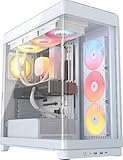
The Corsair Frame 4500X RS-R ARGB sits at the top of Corsair’s panoramic glass lineup, with the “Frame” name reflecting its emphasis on structural rigidity rather than sheer volume. It suits builders who want the wraparound glass aesthetic with a chassis that feels solid, and who value Corsair’s cooling ecosystem for matching fans, coolers, and power supplies. The white finish and included RS-R ARGB fans round out a complete out-of-the-box presentation.
As a mid-tower, the 4500X balances interior space against desk footprint. The panoramic glass corner provides the continuous view, and the RS-R ARGB fans supply both airflow and lighting without an additional purchase.
- Form factor: mid-tower with panoramic glass
- Structure: rigid frame design for reduced flex
- Included cooling: RS-R ARGB fans
- Panels: wraparound glass corner
- Finish: white exterior and interior
- Radiator support: 240mm and 360mm class AIO mounting
- Ecosystem: full Corsair accessory and parts compatibility
Strengths
The rigid frame matters more than it sounds. Large glass panels flex a case’s structure, and a chassis that resists that flex keeps panels aligned, reduces vibration noise, and makes the glass feel properly seated every time you remove and refit it. Corsair pairs that structure with a clean panoramic glass joint and a white interior coating, so the showcase effect holds up close as well as at a distance. The RS-R ARGB fans provide immediate lighting, and the 4500X accepts large-format AIO radiators, meaning the case can absorb a future upgrade to liquid cooling without a replacement. Corsair’s spare-parts and accessory availability is the strongest practical argument for choosing it over less established brands.
Pros
- Rigid frame reduces flex and vibration with heavy glass panels
- Panoramic glass with a clean structural joint
- White interior and exterior coating
- RS-R ARGB fans included
- Broad radiator support for AIO upgrades
- Excellent parts and accessory availability from a major brand
Cons
- Premium price tier
- Single-chamber layout means more manual cable management
- No integrated display or back-connect support
- Glass front restricts intake compared with mesh designs
- Heavier than budget cases, which matters if you move it often
How it compares
Against the Corsair 3500X RS ARGB, the 4500X steps up in frame rigidity and premium positioning while keeping the same panoramic philosophy — a straightforward upgrade if you want the best Corsair offers in this format. Against the Lian Li O11 Vision Compact, the Corsair wins on structural rigidity and vendor support, while the Lian Li wins on back-connect support and dual-chamber cable management. If you want the most solid-feeling chassis with the easiest parts availability, choose the Frame 4500X; if you want the cleanest cable-free interior, choose the O11.
11. NZXT H6 Flow RGB – Best for Airflow Plus Included RGB Fans

The NZXT H6 Flow RGB is the same compact dual-chamber airflow concept as the standard H6 Flow, but with three RGB fans included. That single addition changes the buying calculation: instead of budgeting for fans separately, you get lighting and airflow in the box. It suits builders who want the H6 Flow’s airflow-tuned compact design and a lit interior without a second purchase, and who appreciate NZXT’s cable management features.
The panoramic glass panels are retained, as is the angled front intake that directs air across the components. The compact footprint keeps it desk-friendly, and the white finish matches a white component theme.
- Form factor: compact dual-chamber mid-tower
- Included cooling: 3 RGB fans
- Panels: panoramic glass
- Airflow design: high-performance angled front intake
- Cable management: integrated routing channels and tie points
- Finish: white
Strengths
Three included RGB fans plus a compact dual-chamber chassis plus NZXT’s airflow tuning is a strong package at the mid-range tier. The fans cover the essential intake and exhaust roles on day one, and the angled front vents ensure they are feeding air to the components rather than into a dead corner. NZXT’s cable management is a genuine differentiator: the routing channels and tie-down points make a small interior feel manageable. The dual-chamber layout keeps the PSU and cables out of the display area, and the panoramic glass shows off the result. For a compact white build that needs to look good and run cool, this is one of the most complete packages in the roundup.
Pros
- Three RGB fans included
- Dual-chamber layout in a compact footprint
- Airflow-focused angled front intake
- Panoramic glass panels
- Well-designed cable routing channels
- Clean white finish and minimal NZXT styling
Cons
- Premium over the standard H6 Flow due to the included fans
- Compact interior limits CPU cooler height and GPU length
- Three fans provide less coverage than the six- or seven-fan budget options
- Glass panels add weight and cleaning obligations
- Limited radiator capacity compared with larger dual-chamber cases
How it compares
Against the standard NZXT H6 Flow, the RGB version is the better buy if you want lighting included and are comfortable with the price difference; the standard version is better if you already own fans or want to choose specific models. Against the MUSETEX Y6, the NZXT includes four fewer fans but offers superior chassis design, airflow tuning, and cable management. The MUSETEX wins on lighting quantity; the NZXT wins on engineering. Against the Corsair 3500X RS ARGB, the NZXT is more compact and easier to cable-manage, while the Corsair offers a larger interior and broader ecosystem support.
12. ASUS A31 White Edition – Best for Simple White ATX Builds

The ASUS A31 White Edition is the straightforward option: a white ATX mid-tower from a major brand with a clean exterior and standard front I/O. It suits builders who want a reputable chassis without complexity, and who prefer to choose their own fans, lighting, and cooling rather than paying for components bundled in. ASUS’s manufacturing scale also means parts availability and documentation are reliable.
As a conventional mid-tower, the A31 follows familiar assembly steps and accepts ATX, micro-ATX, and mini-ITX boards. The white edition finish gives it a clean appearance that pairs with white components and a white desk setup.
- Form factor: ATX mid-tower
- Finish: white edition
- Motherboard support: ATX, micro-ATX, mini-ITX
- Front I/O: standard USB and audio connectivity
- Cooling: multi-fan mounting positions; fans typically sold separately
- Build intent: general-purpose ATX white build
Strengths
The A31’s case rests on simplicity and brand reliability. There is no proprietary lighting controller to configure, no screen to set up, and no dual-chamber geometry to plan around — you mount the board, install your own fans, and route cables in the conventional way. That makes it a low-risk purchase, particularly for a first build or a system that will be assembled once and left alone for years. White finish consistency across the chassis and panels keeps the case looking intentional rather than a black case with a white front. ASUS’s scale means standoffs, screws, and replacement panels are easy to source if anything goes missing.
Pros
- Clean white finish from a major manufacturer
- Simple, predictable ATX layout
- Reliable parts availability and documentation
- No proprietary lighting or software dependencies
- Good base for a custom fan and lighting setup
- Budget price tier
Cons
- No fans included
- No panoramic glass or dual-chamber design
- Basic cable management compared with NZXT or Lian Li cases
- Less distinctive than the showcase-focused options in this roundup
- Radiator and GPU clearance is conventional rather than generous
How it compares
Against the Lian Li V100-ATX, the ASUS offers brand-scale parts availability and a similarly conventional layout, while the Lian Li offers stronger chassis pedigree and finish consistency. Both are budget-tier white ATX mid-towers without included fans, so the decision often comes down to which brand’s support and documentation you prefer. Against the RUIX OV303, the ASUS gives up four included fans and front USB-C but gains the reliability of a major manufacturer. If you plan to choose your own cooling and lighting anyway, the A31 is the cleanest slate; if you want the case to arrive ready to cool, the RUIX is the better value.
How to Choose
Choosing a white PC case is a compatibility exercise first and an aesthetic one second. Get the four clearance numbers right and almost any case in this roundup will serve you for years. Get them wrong and you will be returning a chassis after discovering your graphics card does not fit or your radiator collides with the top panel.
Start with motherboard form factor
ATX remains the default for mid-range and high-end builds because it offers the most expansion slots, memory slots, and M.2 positions. Every case in this roundup supports ATX, which is why they are all viable for a full-size build. If you are building with micro-ATX or mini-ITX, the same cases will accept your board, but they will look oversized — a compact case matched to a compact board produces a tidier result. Conversely, if you ever plan to move to a full ATX board with four memory slots and multiple PCIe devices, buy the ATX case now rather than replacing the chassis later. The case outlives the motherboard by several generations in most builds.
Measure graphics card length before anything else
Modern flagship graphics cards have grown to the point where case clearance is a genuine purchasing constraint. Three-fan coolers routinely measure between 300mm and 360mm in length, and some exceed that. Before buying, find your card’s exact length in millimeters and compare it against the case’s published GPU clearance. Then subtract roughly 25mm to 30mm for front-mounted fans and any radiator, because a front radiator plus fans can consume 50mm or more of the interior. If a case lists 360mm of GPU clearance and you install a 30mm radiator with 25mm fans up front, your effective clearance drops to about 305mm. That is the calculation that catches builders out.
Match CPU cooler height to your cooling plan
If you are using an air cooler, check the case’s maximum CPU cooler height. Large dual-tower air coolers commonly stand between 155mm and 170mm tall, and compact cases in this roundup may not accommodate the tallest models. Liquid cooling avoids this constraint because the pump block is short, but it shifts the requirement to radiator support. A 240mm AIO is the safe baseline for most mid-towers; 280mm radiators deliver more cooling surface but are wider, so verify the case supports the 280mm class specifically rather than assuming it does. A 360mm radiator offers the most headroom for high-wattage CPUs, and the dual-chamber and premium cases here are the ones most likely to accept one comfortably.
Decide between airflow and showcase
This is the central trade-off in white case buying. Mesh-front cases move more air because nothing obstructs the intake, which suits high-wattage air-cooled systems. Panoramic glass cases present a continuous view of the interior but restrict front intake, so they depend more on side and bottom-mounted fans to feed the components. You can absolutely run a high-end system in a glass-front case — that is what the fan counts in the MUSETEX Y6 and HYXN H3 are for — but you should plan the fan configuration deliberately rather than assuming a single front intake will suffice. A useful rule: for a glass-front case, aim for at least three intake fans in total across side and bottom positions, plus one rear exhaust.
Radiator support and thickness
Radiators come in standard widths — 120mm, 240mm, 280mm, 360mm — but thickness varies from about 25mm for slim units to 45mm or more for performance models. Thicker radiators require more clearance behind the mounting surface, and in compact cases they can collide with the motherboard, memory, or a top-mounted fan. If you plan a thick radiator, favor a case with a dual-chamber or generous top-panel design. Also consider push-pull fan configurations, which double radiator thickness and demand substantially more room. For most builders, a single set of fans on a 240mm or 360mm radiator is the right balance of cooling and complexity.
Finish quality and how white cases age
Not all white cases are white in the same way. Better models coat the interior surfaces — the motherboard tray, PSU shroud, and rear chamber — not just the exterior panels. An interior that is white to match the exterior photograph much better and looks intentional rather than unfinished. Finish durability matters too: powder-coated steel resists chipping better than thin painted panels, and white shows chips and scratches more readily than black because the contrast against bare metal is higher. Handle glass panels by their edges during installation and cleaning, and use a microfiber cloth rather than paper towels, which can leave fine scratches in tempered glass over time.
Dust, cleaning, and the ownership reality
White cases demand more maintenance than black ones, and anyone buying one should accept that upfront. Dust is light gray and highly visible against white interior surfaces and behind glass. A practical schedule: check intake filters monthly, vacuum or rinse them as needed, and do a full interior dusting every three to six months using compressed air and a soft brush. Pay particular attention to the area behind the front intake and beneath the GPU, where dust accumulates quickly. Avoid using household cleaning sprays on painted or glass surfaces; a slightly damp microfiber cloth is enough for panels, and glass cleaner should be applied to the cloth rather than sprayed directly at the case. Beyond dust, the parts most likely to wear out first are the fans — bearings degrade and produce noise after a few years, so cases with standard 120mm or 140mm fan mounts make replacement easier than proprietary designs.
Match fan count to your thermal load
| Build tier | Typical CPU | Recommended intake fans | Recommended exhaust fans | Cooling type |
|---|---|---|---|---|
| Entry gaming | 65W class | 2 x 120mm | 1 x 120mm | Air cooler |
| Mid-range gaming | 105W class | 3 x 120mm | 1 x 120mm | Air or 240mm AIO |
| High-end gaming | 125W+ class | 3 x 120mm plus 2 x 120mm bottom | 2 x 120mm | 280mm or 360mm AIO |
| Workstation | High core-count class | 4 x 120mm | 3 x 120mm | 360mm AIO or dual radiator |
A quick decision matrix
| Your situation | Recommended case | Why |
|---|---|---|
| Tight budget, full ATX build, long GPU | Lian Li V100-ATX (V100RW) | Budget tier with conventional roomy ATX interior and strong clearance |
| Want RGB lighting without buying fans | MUSETEX Y6 | Seven PWM infinity-mirror ARGB fans included |
| Back-connect motherboard, showcase build | Lian Li O11 Vision Compact | Purpose-built back-connect support with dual-chamber cable routing |
| Panoramic look at mid-range price | Corsair 3500X RS ARGB | Wraparound glass with white interior coating |
| Small desk, airflow priority | NZXT H6 Flow | Compact dual-chamber with angled front intake |
| Want included reverse-fan lighting | HYTE Y50 RGB Essential | 360mm-class reverse aRGB fan plus 120mm unit included |
| Need front USB-C on a budget | RUIX OV303 | USB 3.0 and Type-C with four prism ARGB PWM fans |
| Compact dual-cavity with maximum fans for the money | HYXN H3 | Six infinity-mirror PWM ARGB fans in a dual-cavity compact body |
| Want a display on the case | HYTE Y70 Touch Infinite | Integrated 2.5K LCD touchscreen for telemetry or custom visuals |
| Want the most rigid premium glass chassis | Corsair Frame 4500X RS-R ARGB | Rigid frame design with panoramic glass and full ecosystem support |
| Compact airflow build with RGB included | NZXT H6 Flow RGB | Three RGB fans with the same airflow-tuned compact chassis |
| Minimal white build, choose your own parts | ASUS A31 White Edition | Simple major-brand ATX chassis with reliable parts availability |
Budget allocation guidance
A useful way to think about case spending is as a percentage of total build cost. For a mid-range gaming system, allocating roughly 5 to 10 percent of the budget to the case is typical. Spend less and you may compromise on structure or cooling; spend more and you are diverting money from the GPU, which determines gaming performance far more directly. The exception is a showcase or streaming build, where the case is part of the presentation and a larger share is justified. If you are choosing between a better case and a better GPU at the same price difference, choose the GPU unless the case is physically incompatible with your components.
Frequently Asked Questions
Do white PC cases show dust and scratches more than black ones?
Yes, noticeably more. Dust appears as gray film against white interior surfaces and is very visible behind glass panels, while black interiors mask it. Scratches and chips also stand out more on white because the bare metal or plastic beneath contrasts sharply. The practical consequence is a slightly higher cleaning cadence — monthly filter checks and a full interior dusting every three to six months — and careful handling of painted panels during installation.
Can I fit a 360mm radiator in a compact mid-tower white case?
Often yes, but it depends on the specific chassis and mounting position. Many compact dual-chamber cases support a 360mm radiator in the side or top position while limiting front mounting. The constraint is usually thickness rather than length: a 30mm radiator with 25mm fans needs about 55mm of clearance, and thicker performance radiators need considerably more. Always check the manufacturer’s published radiator support figures for each mounting position rather than assuming a 360mm fit from the case’s overall size.
How do I calculate whether my GPU will fit with a front radiator installed?
Take the case’s published maximum GPU length and subtract the combined thickness of the radiator and its fans. A 30mm radiator plus 25mm fans consumes roughly 55mm, so a case rated for 360mm of GPU clearance effectively offers about 305mm once a front radiator is installed. Compare that figure against your card’s exact length with a 20mm to 30mm safety margin. If the result is close, consider moving the radiator to the top or side position instead.
Is back-connect motherboard support worth choosing a specific case for?
If you own or plan to buy a back-connect motherboard, yes — the difference in cable management is substantial. Power and front-panel headers plug in behind the tray, which removes the most visually prominent cable bundle from the main compartment. If your motherboard uses a standard front-connect layout, back-connect support in a case provides no benefit, though cases with this feature generally also handle conventional boards well.
How many fans do I actually need in a glass-front case?
For a mid-range gaming build, three intake fans plus one exhaust is a reliable baseline. Because a glass front restricts direct intake, distribute those three across side and bottom positions where they can draw air without obstruction. High-end builds with 125W-plus CPUs and large GPUs benefit from additional bottom intake and dual exhaust, especially when a radiator is involved. More fans are not automatically better — six poorly tuned fans can be louder than three well-tuned ones.
Should I buy a case with pre-installed fans or add my own?
Pre-installed fans save money and planning, particularly in cases like the MUSETEX Y6, HYXN H3, and RUIX OV303 where the included fan count is high. If you have specific preferences about fan brands, bearing types, or lighting styles, a case without fans like the ASUS A31 or the standard NZXT H6 Flow gives you a clean slate. A useful middle path is buying a case with three or four included fans and replacing only the loudest ones later if they develop bearing noise.
How long should a PC case last, and what wears out first?
A well-built case can comfortably outlast two or three complete component generations, often seven to ten years or more. The parts most likely to fail first are the fans, whose bearings degrade and grow noisy after a few years, and the front-panel USB ports, which loosen with repeated use. Glass panels rarely fail unless dropped, but their mounting clips and rubber grommets can perish. Choosing a case with standard 120mm or 140mm fan mounts and replaceable front I/O makes long-term maintenance straightforward.
Does a white case affect cooling performance?
Color itself has a negligible effect on internal temperatures. What matters is the case’s structural design: whether the front is mesh or glass, how many fan mounts exist and where, and how much clearance there is around the GPU and CPU cooler. A white mesh-front case will cool better than a black glass-front case of similar size, and vice versa. Choose based on airflow design first, then pick the color that matches your build.
The Bottom Line
For most builders, the Lian Li O11 Vision Compact is the right white case: it handles back-connect motherboards, hides its cables in a second chamber, and supports large radiators, so it stays relevant through several upgrade cycles. If your budget is the binding constraint, the Lian Li V100-ATX gives you a well-built white ATX chassis with room for a long GPU at the lowest tier here. If you want lighting handled on day one, the MUSETEX Y6 or HYXN H3 includes more fans than anything else in this roundup. If desk space is tight, choose the NZXT H6 Flow or H6 Flow RGB for its compact dual-chamber design and airflow-tuned intake. And if the case itself is meant to be the centerpiece of your setup, the HYTE Y70 Touch Infinite is the only option with a screen built in. Whichever you pick, verify GPU length, CPU cooler height, and radiator support against the published figures before you buy — those three numbers decide whether your white build comes together cleanly or stalls halfway through assembly.


